🦁 🐘
Animals520 words
LanGeek Picture Dictionary
A Dictionary to Learn Words Visually
LanGeek turns dictionary lookup into a visual vocabulary-learning experience. Explore words through meaning-specific images, clear definitions, audio pronunciation, examples, translations, grammar information, and connected review tools.
✓
Designed for language learners who need more than a short definition, from first vocabulary encounters to advanced usage and word-family study.
🦋
butterfly/ˈbʌtərflaɪ/
🍎
applenoun
🌳
treenature

Picture DictionaryLearn vocabulary visually
●
Search for a word⌕
AllAnimalsFoodHome
WORD OF THE DAYButterfly/ˈbʌtərflaɪ/
🦋
Popular categoriesExplore words by topic
View all🍇 🥕
Food410 words🛋️ 🪴
Home360 words🌲 🌻
Nature290 words🐢
Turtle/ˈtɜːrtl/
♪
⌂Home
▦Browse
◎Practice
♡Saved
Built as a learning platform
Not simply a search result page
16,000+
purpose-built vocabulary images
4
main learning languages
26
supported translation languages
More than a lookup tool
A dictionary designed around how vocabulary is actually learned
Traditional dictionaries are excellent reference tools, but a learner often needs more than a definition. They need to see the concept, hear the word, understand its context, compare meanings, and return to it later.
The LanGeek Picture Dictionary brings these steps together. Each supported entry is built as a learning page where visual meaning, pronunciation, examples, translation, grammar, usage information, and review actions work together.
This structure is useful for quick searches, but it also supports deeper vocabulary study. A learner can begin with a picture, confirm the meaning with a definition, listen to the pronunciation, examine examples, explore related forms, and save the word for later review.
Picture dictionary
A visual reference and learning resource that connects words to images, context, pronunciation, and related information so meaning is easier to understand and remember.

Browse, do not only search
Discover vocabulary through visual categories
The English Picture Dictionary homepage gives learners a second way to find words. Instead of beginning with a word they already know, they can open a visual topic and discover vocabulary connected to everyday subjects.
Categories such as animals, food, jobs, clothing, transportation, nature, feelings, and household objects make the dictionary useful for planned vocabulary study as well as quick reference.
Explore related vocabulary around a shared topic.
Use category images as memory cues before opening individual entries.
Move between browsing and direct word search without leaving the dictionary.
Core experience
Every part of the entry has a learning purpose
LanGeek combines six layers of vocabulary information, so users can move from recognition to accurate use without opening several separate resources.
Images made to explain vocabulary, not merely decorate it
Custom visuals focus attention on the intended meaning. Concrete words can be shown directly, while abstract words, idioms, and figurative expressions can use conceptual scenes.
Explore word imagesLearner-friendly definitions
Definitions use accessible wording and are organized by meaning, helping learners confirm exactly what the image and example are showing.
Explore definitionsAudio pronunciation
Listen to the spoken form and connect spelling to sound. English entries may also help learners compare American and British pronunciation.
Explore PhonoMapNatural examples
Examples show grammar patterns, collocations, prepositions, and the exact sense of a word inside a sentence.
Explore examplesDefinitions and examples in translation
Translation support helps learners confirm meaning through a familiar language while still seeing the target word in context.
Explore translations
06 / Deeper understanding
Grammar, usage, word families, and regional variation
Supported entries can go beyond basic meaning with information that helps learners choose and use vocabulary more accurately.
Explore word families
Usage labels
Verb patterns
Word families
Inflected forms
American English
British English
Related forms
Grammar notes
See the tools in context
Focused features inside the dictionary entry
These interface examples show how pronunciation, translation, and word-family information are presented as practical parts of the entry rather than separate learning resources.
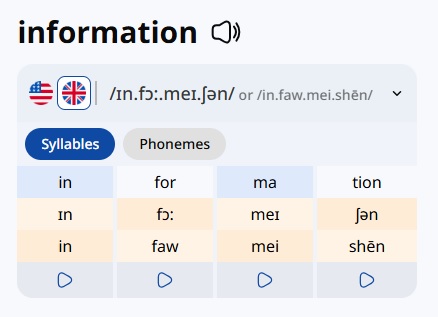
Pronunciation
PhonoMap makes sound structure visible
Learners can compare pronunciation varieties, break a word into syllables or phonemes, and play individual sound groups. This is especially helpful when spelling does not clearly predict pronunciation.
Learn about PhonoMap →
Translations
Choose both the learning language and support language
Learners can select the dictionary they want to study and choose a familiar language for translated definitions and examples. This creates a more accessible path into the target language.
Learn about translations →
Word formation
Lexical trees connect related forms
The Word Family Tree presents roots and related words visually. Learners can see how forms such as form, format, formation, and information are connected.
Learn about lexical trees →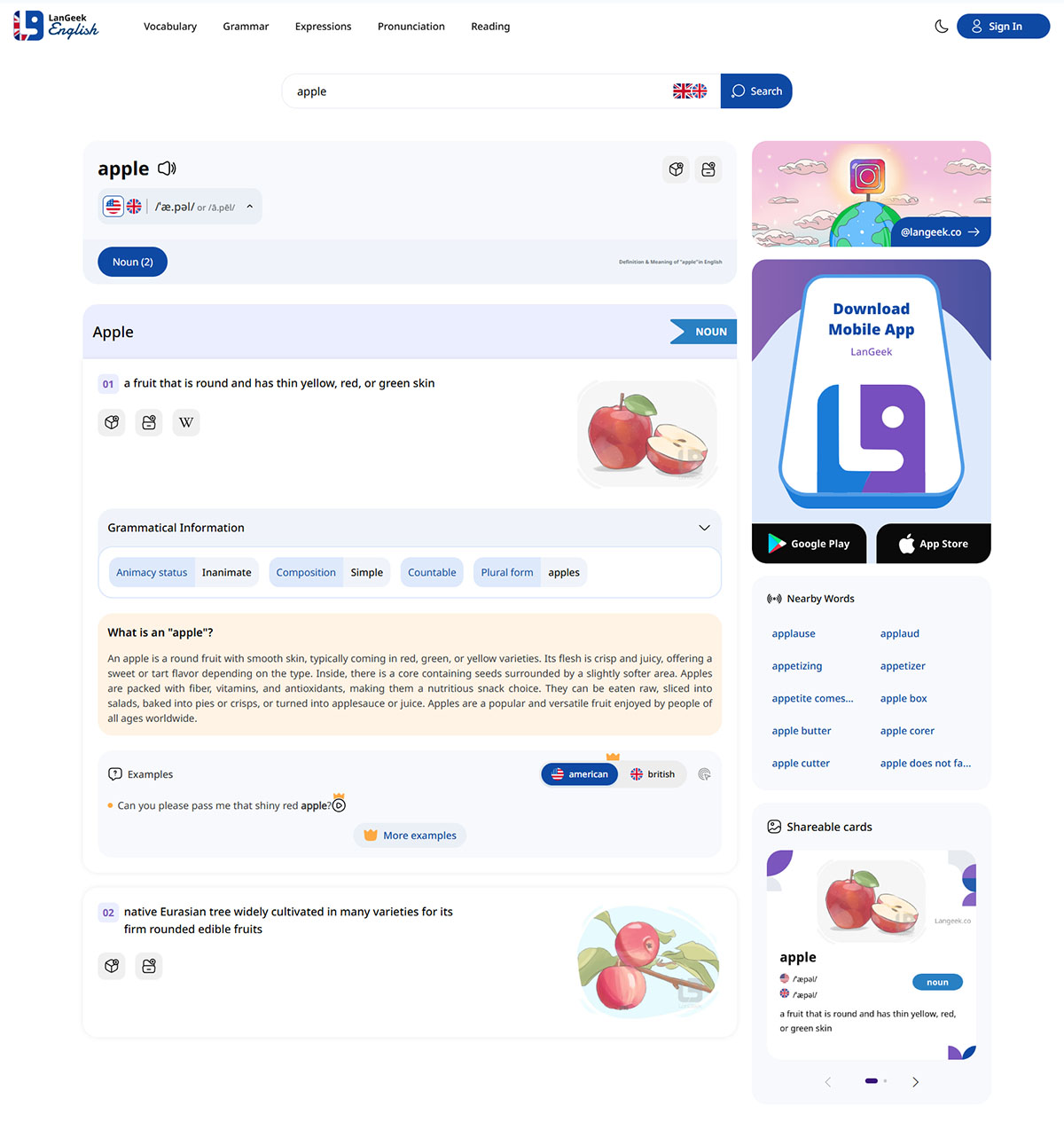
One word, one organized learning page
Anatomy of an entry
What learners can do after searching a word
The complete entry for apple shows how several layers of information can appear on one page. The exact content varies by word and language, but the learning sequence remains clear.
Recognize the word
See the headword, grammatical category, written form, and pronunciation information.
Identify the intended meaning
Use a meaning-specific image and concise definition to distinguish one sense from another.
Hear how it sounds
Play the audio and use available pronunciation guidance to notice individual sounds and stress.
See how it behaves in context
Read examples to understand sentence structure, common word partners, and natural usage.
Connect it to related vocabulary
Explore word-family relationships, forms, related meanings, and useful regional equivalents where available.
Save it for active review
Add the word to a personal wordlist or review system so the lookup becomes part of long-term learning.
From search to memory
A practical four-step vocabulary workflow
Use the Picture Dictionary for a fast answer, or continue through the full learning process when a word matters to you.
Search
Enter a word or phrase and choose the relevant meaning from the available entry information.
Understand
Combine the image, definition, translation, and examples instead of relying on one clue alone.
Notice
Pay attention to pronunciation, grammar, collocations, usage labels, and related forms.
Review
Save useful words and return to them through Personal Wordlists, Daily Words, and vocabulary exercises.
Choose a language
Four visual dictionaries in one learning ecosystem
LanGeek provides dedicated Picture Dictionary experiences for English, Spanish, German, and French. English currently includes the broadest range of advanced entry features.
EN
Picture Dictionary
English
Visual vocabulary, pronunciation, examples, translations, word families, usage information, and advanced grammar support.
Open English Dictionary → ES Diccionario visualSpanish
Study Spanish vocabulary through images, definitions, examples, pronunciation, and translated support.
Open Spanish Dictionary → DE BildwörterbuchGerman
Explore German words visually and connect vocabulary to sound, meaning, context, and translation.
Open German Dictionary → FR Dictionnaire visuelFrench
Build French vocabulary with visual entries, learner-oriented explanations, examples, and pronunciation.
Open French Dictionary →
Designed for different needs
Who benefits from a visual dictionary?
The same entry can support a beginner looking for immediate clarity and an advanced learner studying precise usage.
Beginners
Images, translations, audio, and short definitions reduce the difficulty of encountering a completely unfamiliar word.
Intermediate learners
Examples, collocations, pronunciation, and connected forms help vocabulary become more natural and usable.
Advanced learners
Usage labels, regional equivalents, grammar patterns, and word families support greater precision and nuance.
Teachers and independent learners
Entries can work as ready-made visual teaching references or as structured self-study material.
Use it effectively
Turn each lookup into a stronger memory
Small changes in how you use a dictionary can greatly improve vocabulary retention.
Predict before reading
Look at the image and try to identify the meaning first. Then use the definition to confirm or correct your interpretation.
Listen before looking at phonetic guidance
Try to notice the sounds and stress by ear, then check the available pronunciation information.
Study examples as patterns
Do not read examples only for meaning. Notice the verbs, prepositions, nouns, and structures that commonly appear around the word.
Compare related forms
When available, connect nouns, verbs, adjectives, and adverbs so you can recognize the same word family in new contexts.
Save selectively
Add words that are relevant to your current goals. A smaller, meaningful wordlist is easier to review consistently.
Use the word soon
Write a sentence, say it aloud, or notice it in a real text. Active use makes the dictionary entry more memorable.
Common questions
Picture Dictionary FAQ
Answers to the main questions learners may have before using the platform.
What is the LanGeek Picture Dictionary?
It is an online visual dictionary for language learners. Supported entries combine images, definitions, pronunciation, examples, translations, usage information, and connected study tools.
Which languages can I study?
LanGeek currently provides dedicated Picture Dictionary experiences for English, Spanish, German, and French. English has the widest range of advanced entry information.
Are the pictures generic stock images?
LanGeek uses purpose-built vocabulary images intended to clarify particular meanings. This is especially useful when a crowded or generic photograph would not explain the word accurately.
Does it include pronunciation?
Yes. Entries include audio pronunciation where available. English entries may also include American and British pronunciation support and visual guidance through PhonoMap.
Can I save words for later?
Yes. Learners can connect dictionary lookup to Personal Wordlists and Daily Words, allowing important vocabulary to be organized and reviewed later.
Is it only useful for beginners?
No. Beginners benefit from pictures and translations, while intermediate and advanced learners can use examples, usage labels, pronunciation, grammar patterns, regional equivalents, and word families.
Explore vocabulary through more than definitions
Open the LanGeek Picture Dictionary and connect words to images, sound, context, translation, grammar, and long-term review.